この記事は、Zennに投稿した記事を一部編集して転載したものです。
概要
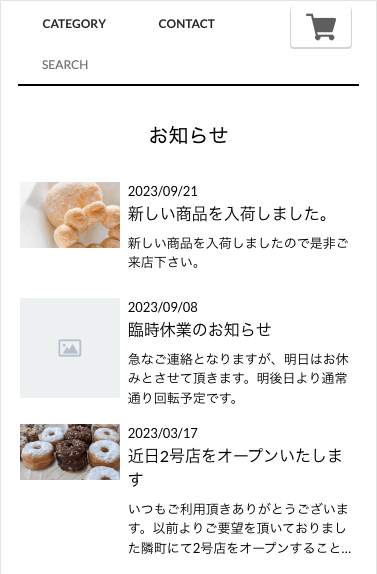
BASEの「Blog App」機能を使用して、ショップのトップページに複数のブログ記事を表示する方法を解説します。標準の固定記事機能では1件のみの表示に限定されるため、Blog RSSを活用した改良版の実装方法を紹介します。
コード実装
HTML
{block:AppsBlog}
  <!-- blogを呼び出し -->
  <div id="blog-set"></div>
{/block:AppsBlog}
JavaScript
{block:IndexPage}{block:NoIndexPageCategory}{block:NoIndexPageSearch}
{block:AppsBlog}
<script>
  $(function(){
      $.ajax({
          url: '{BlogFeedPageURL}',
          type: 'GET',
          dataType: 'xml',
      })
      .done(function(data) {
          i = 1;
          $('item', data).each(function() {
              var link = $('link', this).text();
              var title = $('title', this).text();
              var image = $('image', this).text();
              var content = $('content\\:encoded', this).text();
              var pub_date = $('pubDate', this).text();
              var pd = new Date(pub_date);
              var y = pd.getFullYear();
              var m = ('00' + (pd.getMonth() + 1)).slice(-2);
              var d = ('00' + pd.getDate()).slice(-2);
              var res = y + '/' + m + '/' + d;
              var blog_content = '<div class="blog-wrap"><div class="blog-wrap__img" style="background-image: url(' + image + ');"></div><div class="blog-wrap__contants"><a href="' + link + '"><div class="blog-wrap__date">' + res + '</div><div class="blog-wrap__title">' + title + '</div><div class="blog-wrap__article">' + content + '</div></a></div></div>';
              $('#blog-set').append(blog_content);
              if (i >= 3) {
                  return false;
              }
              i++;
          });
      });
</script>
{/block:AppsBlog}
{/block:NoIndexPageSearch}{/block:NoIndexPageCategory}{/block:IndexPage}
CSS
.blog-section__title{
  text-align: center;
  margin-bottom: 32px;
  font-size: 20px;
  font-weight: 300;
}

#blog-set{
  width: 90%;
  margin: 0 auto;
}
.blog-wrap{
  display: flex;
}
.blog-wrap:nth-child(n+1){
  margin-bottom: 16px;
}
.blog-wrap__contants{
  margin-left: 8px;
}
.blog-wrap__img {
  min-height: 100px;
  min-width: 100px;
  background-size: contain;
  background-repeat: no-repeat;
  background-position: top;
}
.blog-wrap__title{
  font-size: 16px;
}
.blog-wrap__article{
  margin-top: 8px;
  overflow: hidden;
  display: -webkit-box;
  -webkit-box-orient: vertical;
  -webkit-line-clamp: 3;
}
主な特徴
- 複数記事表示:デフォルトの固定表示機能とは異なり、複数のブログ記事をトップページに展開可能
- 記事情報の充実:公開日付、画像、タイトル、本文抜粋を表示
- レスポンシブ設計:フレックスボックスを使用したレイアウト
- テキスト制限:CSSで本文を3行に制限して、スペース効率化